This week’s post was inspired by an event that happened to me some time back. I was trying to scaffold an angular project. Unfortunately for me, it just was not my day.
I kept going against a brick wall. After reading around for a bit, I realized that all I had to do was to open a port. After that the problem was solved and I continued on my merry way. What exactly did I do , you say ? Before I reveal that, lets first start with what a port is.
A port is a process-specific software which serves as the communications endpoint on a computer’s OS. It is associated with an IP address of the host PC. I always like to use the television analogy when explaining ports.
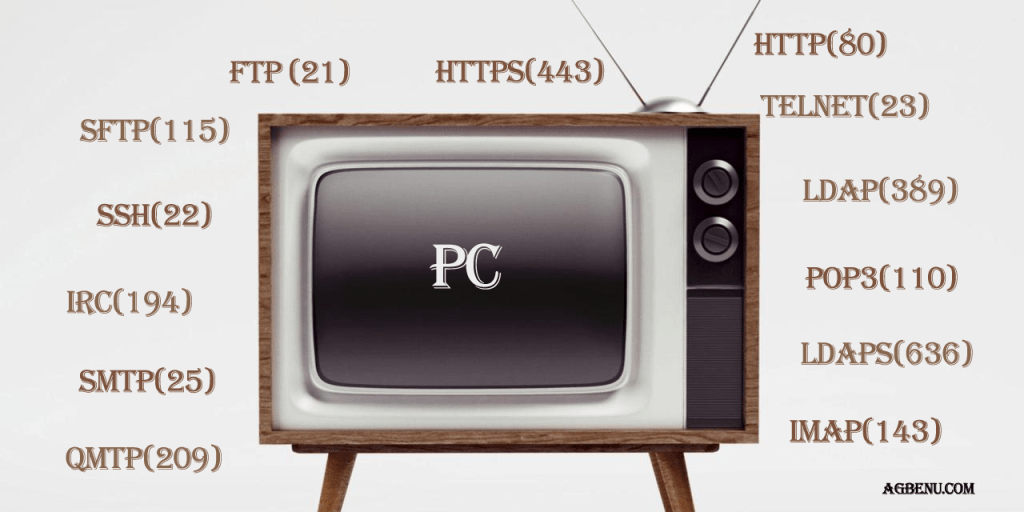
Think of the PC as a television. The port numbers are the television channels. This means there are several ports on any 1 PC. Some port numbers are reserved, while you can configure the numbers for others.
Just like the different channels on a television station, the purpose of the ports is to keep each process running. The television channel numbers tell you which TV station is associated with which channel number whiles the port numbers tell you which applications are running on the host PC.
Continuing from there, let me remind you there are two types of ports, TCP and UDP. TCP or Transport Control Protocol sends data directly from the sending PC to the host PC, and then keeps the connection between the two hosts the entire time. With TCP, there is a higher over load on the PC to monitor the connection, but on the bright side you can be assured that the data will reach the recipient PC.
UDP or User Datagram Protocol, on the other hand, has less overhead as compared to TCP since it does not give us this guarantee when it sends the data packets into the network. The downside to this approach is that you cannot be assured that the data will reach the intended recipient.
By default,most websites use HTTP, which is on port 80 and HTTPS on port 443. However urls like http://www.agbenu.com:8080 specifies that the web sites should be accessed on port 8080 and served by the HTTP server.
Port numbers are accessed after a colon. For example http://www.examplesite.com:1234
Substitute 1234 for an actual port number, and replace examplesite with an actual site and you are good to go. Right now, you are accessing this site via port 80.
Some well known port numbers are :
21: FTP Server
22: SSH Server (remote login)
23:Telnet
25: SMTP (mail server)
53: Domain Name System (Bind 9 server)
80: HTTP
110: POP3 mail server
115: Secure File Transfer Protocol (SFTP) services
143: IMAP mail server
194: Internet Relay Chat (IRC)
209: Quick Mail Transfer Protocol (QMTP)
389: Lightweight Directory Access Protocol (LDAP)
443: HTTP over Transport Layer Security/Secure Sockets Layer (HTTPS)
445: Microsoft DS, Server Message Block over TCP
636: Lightweight Directory Access Protocol over Secure Sockets Layer (LDAPS)
Alot more port numbers can be seen when you google online. To solve the problem, I had to see if the port was open, and open the port if it was not already open.
Now onto the command to verify if a port number is open. I should first let you know that I run these commands on a Linux machine. The command to verify whether a port is open in Linux is as follows:
netstat -nap | grep : portno
Where portno should be replaced with the numerical port number you want to check, if it is open or not.
For opening a TCP port, you can type the following command:
iptables -A INPUT -p tcp -dport portno -j ACCEPT
Where portno needs to be replaced with the numerical port number that you want to open.
For opening a UDP port, type the following command:
iptables -A INPUT -p udp -sport portno -j ACCEPT
Here portno needs to be replaced with the numerical port number that you want to open.
As pertaining to my particular situation, my bower install was not working since I kept getting the error
bower ECMDERR Failed to execute “git ls-remote –tags –heads git://github.com/twbs/bootstrap-sass.git”, exit code of #128
Additional error details:
fatal: unable to connect to github.com:
github.com[0: 192.30.252.128]: errno=Connection refused
At the time, I found the reasons for this included a port is blocked. The solution was to run the command
git config –global url.”https://”.insteadOf git://
This would make git use https instead of git:// when trying to fetch git repos.
Another very possible reason is that the machine is behind a firewall. In this specific scenario, the solution would be to open port 9418. This is the port on which the git:// protocol uses.
I should think would enough about ports for now. We don’t want to go into information overload, do we ? Do comment, if it was in any way beneficial to you.
Thanks for your time, and cheers.
 Eli Agbenu
Leave a comment